D2X-XL Worklog
Notes on features and problems from the development of D2X-XL, newest first.
DLE: Improved Tunnel Generator |
|
Motivation The last area I (and everybody I asked) could think of DLE lacking in was it's tunnel generator: Using a bezier function to compute the tunnel's path couldn't outweigh its massive restriction of only being able to create tunnels consisting of a single string of connected segments. Compared to DEVIL's tunnel generator this looked like a feeble attempt to say 'look, we can do that, too'. Yet I shied from changing this, for once because I never really had used DLE's tunnel generator (for obvious reasons), but for the most part because I was well aware of how much effort that would require. Start My initial hope was that I could simply port DEVIL's corridor generator code (which would have been perfectly legal, as DEVIL comes under a GPL). After having taken more that just one look at DEVIL's code, that hope quickly waned. "Hellish" might come quite close to the truth. The author had known what he was doing algorithmically and mathematically, but coding wise it is a nightmare. DEVIL's code is almost unreadable spaghetti code, having as little whitespaces as possible and linebreaks everywhere to keep line length under 80 characters. Often several statements are put on a single line. Instead of using distinct data types and only wrapping them into more general ones when necessary, all important items are wrapped into a general structure tellingly named "node", containing a union of all these items' data types. References between these items are realized as pointers to "node" instead of the actual underlying data type. This was probably meant to be flexible, but actually it is exaggerated to the point of totally obscuring many operations of the code. There also are oddities like putting everyting into structs - even a vector consisting of three float values. It didn't exactly help that DEVIL's code is a completely typedef free zone. What makes things even worse than they already are is that many of its identifiers consist of one or two letters. Looking at that will make you understand why C was regarded as being dangerous and cryptic to code with. So this was a no go. To my luck, I have to say in retrospect. The Real Deal So I started to completely develop the required data structures, processes and math by myself. First of all I broke DLE's original tunnel generator code into functionally separated units, creating classes for the bezier function, the tunnel path management, single tunnel segments, tunnel bases (start and end sides and vertices) and the overall tunnel generator. While I was doing this I still preserved the original tunnel generator functionality to be able to ensure that everything worked. Once I had tidied and restructured the old tunnel code, I started to completely replace its quite circuitous math. My first approach was to go via rotation matrices and extract all required angles from these. Due to mathematical issues like Gimbal lock this turned out not to be an acceptably well working approach. Finally I turned to using quaternions (think of them as rotation vectors and angles in imaginary space), and this was the break through in my work. Quaternions are much simpler to handle than rotation matrices, and they made it incredibly easy to compute the angles and rotations necessary to interpolate the orientation matrices of all tunnel path nodes between start and end orientation. The only hurdle here was that retrieving rotation angles this way didn't not intrinsically yield the rotation direction (clockwise or counter clockwise). I found a mathematically solid solution for this problem too (and a more elegant alternative I admit I didn't bother to test, so I just wrote it in a comment), and finally arrived at my goal: A solid, flexible, 100% working multi base side tunnel generator. Pains And Failures
It has been a steep and rocky path I have taken on my way there, and looking back it was one of the hardest pieces of work I have ever accomplished
in the D2X-XL realm. I made about every dumb mistake I could possibly have made (like checking for vectors being parallel by testing their dot
(scalar) product against 0.001 instead of 0.999 to check whether they were parallel, or forgetting to do certain rotations) - and dumb mistakes
like that are the hardest to find for me because I fail to look at trivial code when searching for bugs - I always assume that something that simple
cannot be the reason ... something I fall to over and over. Operations
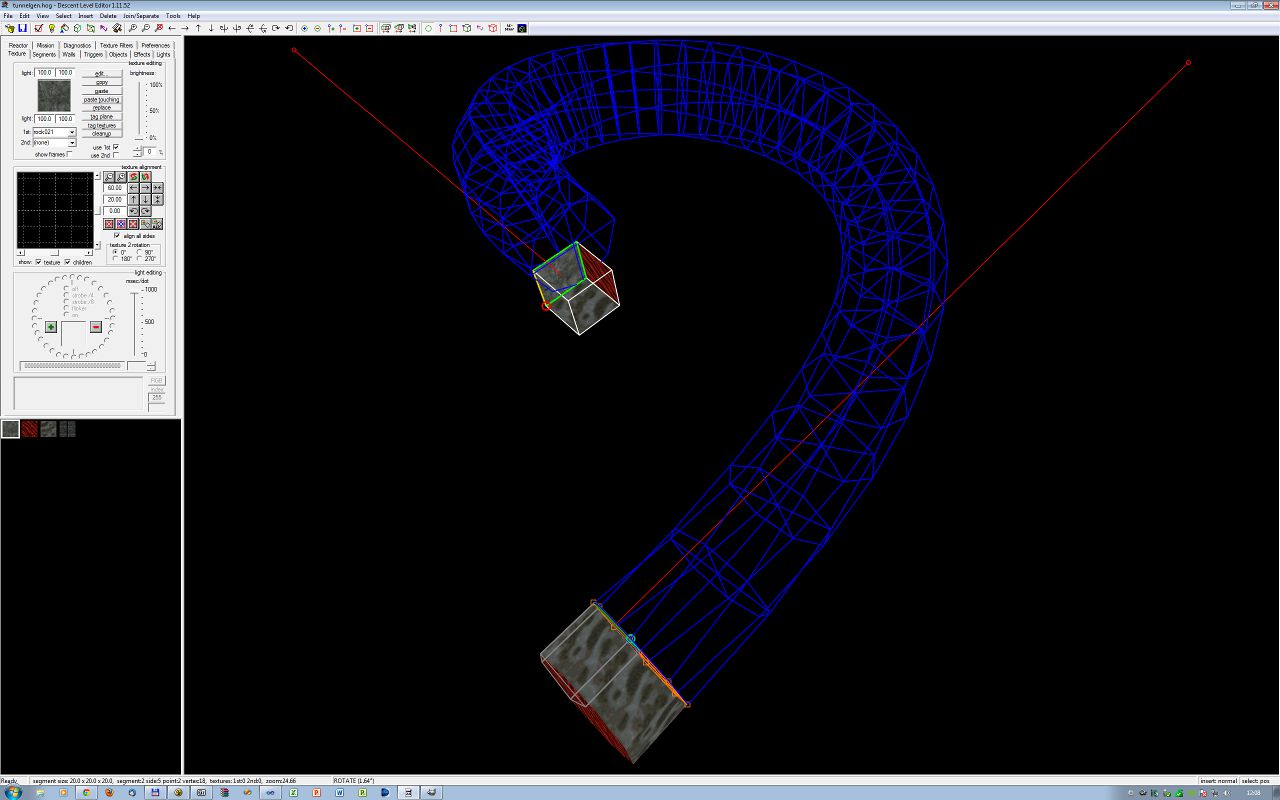
Creating a tunnel works quite similar to how it did so far: The start side is the "current" side, while the "other" sides denotes the end side.
To have multiple start sides, just tag all sides you wish to include. The only limitation is that they have all to be connected and at an angle
of 22.5 degrees or less to the start side. Press 'G' to launch the tunnel generator. You can change the tunnel's end orientation by manipulating the
end side's vertices or moving the end side around altogether (just move the "current" side around to do this). To change the curvature, press
CTRL+8 or CTRL+9 while the current side is at the tunnel start or end. To change its granularity (big word for adding or removing segments from
the tunnel Helpful Stuff To aid in creating nice tunnels, DLE now has a new function dubbed "Make Points Parallel". The purpose of this function is to move all tagged vertices in the same plane. This plane is determined by the current side and its normal (or the average of the normals of the two triangles composing the side). If one or more of the side's vertices are tagged, all tagged vertices will be moved into the side's plane. Otherwise, they will be moved into a plane parallel to the current side's plane. The distance of the two planes is the average distance of the tagged vertices to the current side's plane before moving them. If no vertex is tagged, the current side is made coplanar, i.e. its vertices are moved into the side's plane as described above. The benefit of this feature is that you fix slight geometric distortions that have occurred when editing a level and put vertices in the same plane that belong there. Using the current side as reference gives you a flexible way of determining what that plane is. The function is available via the mine view's context menu. Let me close this article with a picture from a simple test level I have made:
|
 Another mistake I made was to keep going and going, digging my
teeth deeper and deeper into problems like a pitbull that cannot let go anymore instead of stepping back, relaxing, having a good time doing
something else and giving my subconscious enough room and time to process the problem in the background. Indeed I often had - if not to say
'all the time' - had inspirations of how to solve a problem when waking up in the morning or just enjoying myself with my family.
Another mistake I made was to keep going and going, digging my
teeth deeper and deeper into problems like a pitbull that cannot let go anymore instead of stepping back, relaxing, having a good time doing
something else and giving my subconscious enough room and time to process the problem in the background. Indeed I often had - if not to say
'all the time' - had inspirations of how to solve a problem when waking up in the morning or just enjoying myself with my family.
 ), press ALT+8 or ALT+9. Change the tunnel's twist by moving the current point of the "current" or "other"
side around. Press 'G' again when your done.
), press ALT+8 or ALT+9. Change the tunnel's twist by moving the current point of the "current" or "other"
side around. Press 'G' again when your done.