


D2X-XL Worklog
Notes on features and problems from the development of D2X-XL, newest first.
DLE-XP: Floating Tools Layout |
|
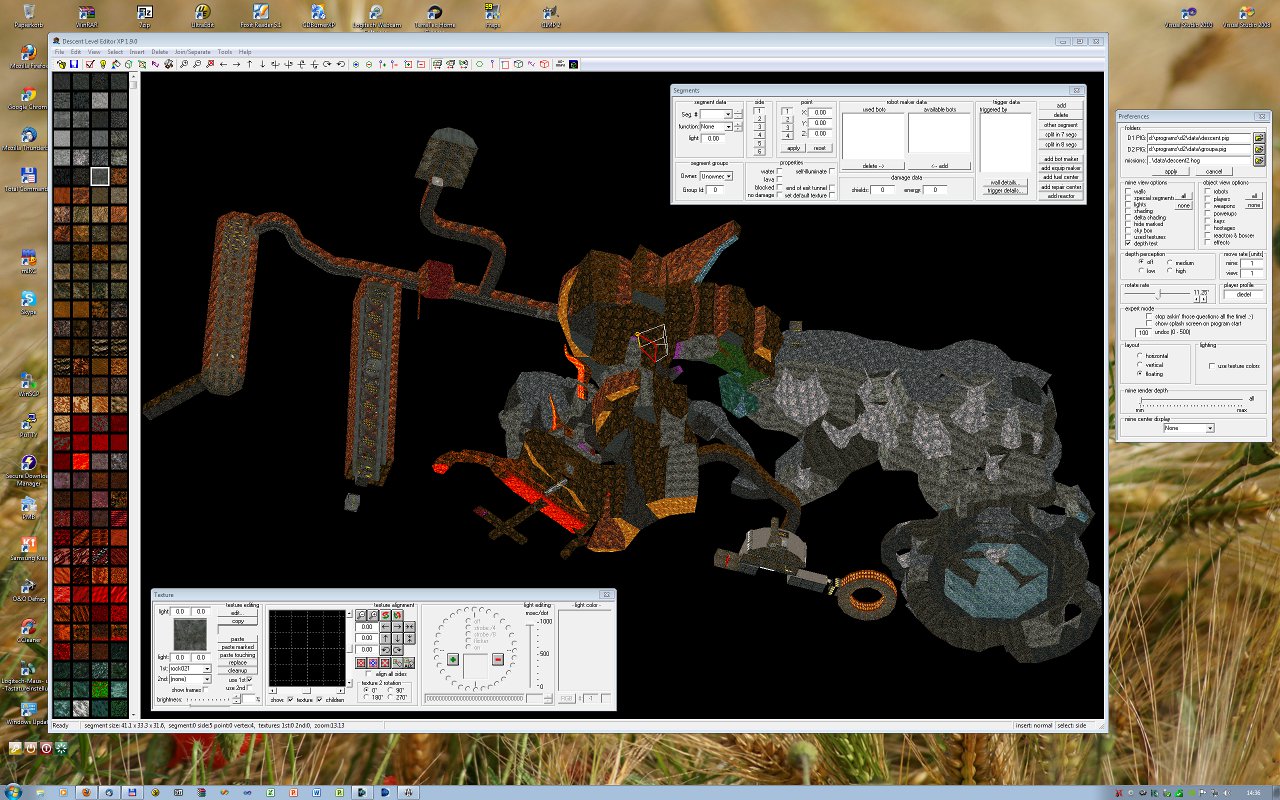
When I had designed DLE-XP, I wanted it to have a nice, tidy interface where the mine editing area would not be obscured by dialogs floating around on top of it, yet where you would have all the functions you needed at any moment of level editing right at your hands, or reachable with a mouse click. I think I have achieved that goal quite well - but while my approach will work well on big screens because the tools and texture selection pane leave a lot of space to the mine view, it wasn't well suited for smaller screens, and particularly for multi-monitor setups using several smaller monitors. I had therefore started to try and rebuild the DMB2 interface as an alternative layout, but since many DLE-XP dialogs bundle several DMB2 dialogs, creating an exact replica of DMB2's multitude of dialogs would have required me to duplicate a lot of code and split it into separate parts for each of the DMB2-style dialogs. When I had started to port DLE-XP to C# .NET, using a nice UI library promised to solve that problem by offering detachable dialog sub windows; but DLE.NET is still quite a bit in the future. After starting to think about it again I finally had a simple and promising idea: Why not just make the current dialogs float? While this would not create an exact copy of the DMB2 interface, it would actually offer its advantages (freely placeable dialogs) while avoiding its disadvantages (too many disjoint dialogs containing related functions). Doing that only took me about six hours, and there it is: DLE-XP 1.9 with a new layout mode 'floating' giving you all tool dialogs in separate windows you can freely move around on your desktop and hide and display them at will. DLE-XP will preserve both the dialog positions and visibility state across program runs, so when you close it and start it again when you have time to do some level editing, all dialogs you had opened will be displayed just where they were when you had closed the program. The only area you cannot detach is the texture selection window. Displaying it at the left window border will however leave a lot of window space for the mineview, and you can always make it smaller or hide it by moving the splitter bar separating the texture and the mine views to the left. The following screenshot (taken at 2560x1600 and resized to 1280x800) shows the DLE-XP main window with two dialogs on top and one at its right side. The dialogs are modeless, so you can use them anytime and changes made there will be reflected in the main window and vice versa. Dialogs can be displayed via the main menu's "Tools" submenu and can be hidden by clicking on their close box.
 |