D2X-XL Worklog
Notes on features and problems from the development of D2X-XL, newest first.
Realtime Glow |
|
Something I was putting off for a long time because I thought that while it was tempting to implement wasn't quite worth the effort was realtime glow. Well, I was in the mood to add a small enhancement to D2X-XL, and since I had most of what functionality I needed for that I set out to do it. It turned out that I had to overcome a few hurdles on my way to useable and acceptably fast glow rendering:
2. Above that glow sources can have different appearance (strength of blur, brightness). That means another instance where the current glow buffer content has to be flushed. 3. The current implementation uses a "lazy" model for handling the glow buffer - it will be filled until some change of parameters or type of render item will enforce a flush. Since it usually changes OpenGL states (shader program loaded, textures bound, etc.), flushing the glow buffer had to be inserted rather thoughtfully, and it took me a while to do this right. 4. 1) and 2) mean that there can be quite a few blur passes per scene. This in turn means burning a lot of fill rate if the entire blur buffer (covering the entire screen or output window) gets flushed. To avoid that the area of the glow buffer that actually contains something has to be determined and rendered. I found this to be particularly difficult. Descent has a function that does a projection of 3D coordinates to 2D screen coordinates, but when I started to use it for viewport calculation I found it to be broken - at least for aspect ratios other than 3:4. At first I thought that just replacing Descent's software projection with multiplying 3D coordinates with OpenGL's projection matrix would solve this problem, but this wasn't the case - the clip space (output window) transformation still had to be done. It took me a bit of reading, but after a while I understood the principle behind this, and as a side product D2X-XL's software projection (which is e.g. needed for visibility culling) has been fixed, too. Glow rendering still can be performance hungry, so it is made dependent on render quality (it will only be available at the two highest quality settings),
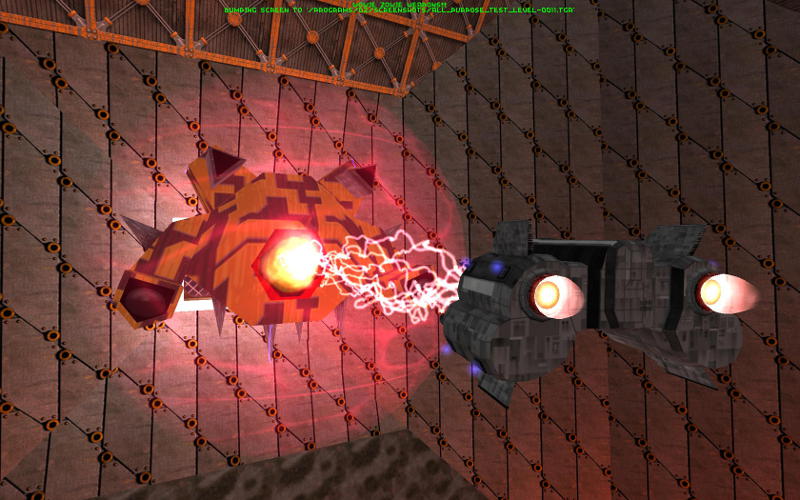
and above that can be enabled manually in the effect options menu. Here's a scene without glow (more detail, but the shield has sharp contours and the lightning effect isn't so spectacular):
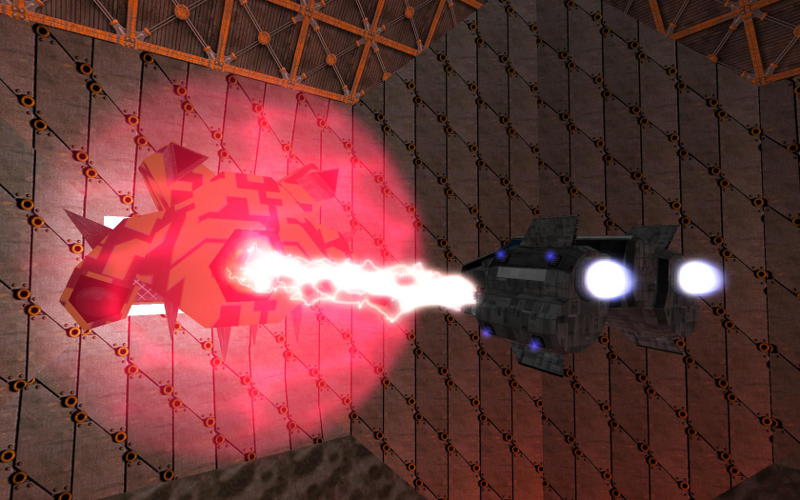
The same scene with glow (blurred shield, impressive lightning effect):
|